
Making purchases
1 Jun 2026
Play the Lotto
Learn how to play the Lotto on the app – it’s safe and convenient.
Step 1 of 11
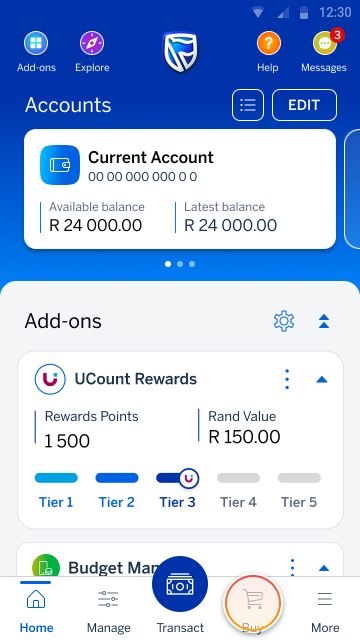
Go to your home screen and tap Buy.
Step 2 of 11
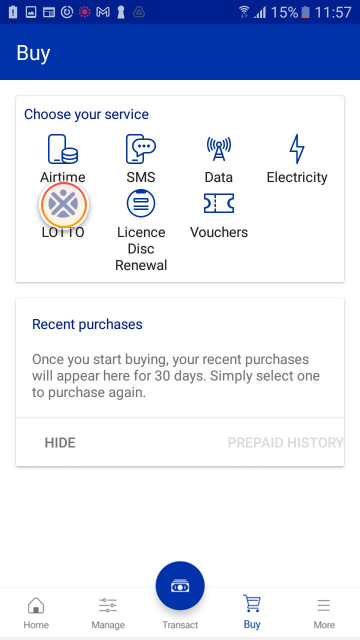
Tap LOTTO from the list of prepaid services.
Step 3 of 11
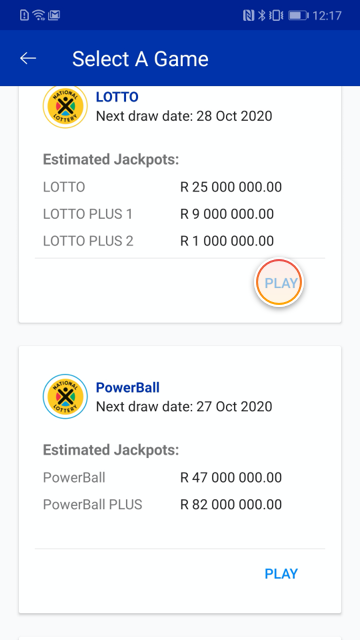
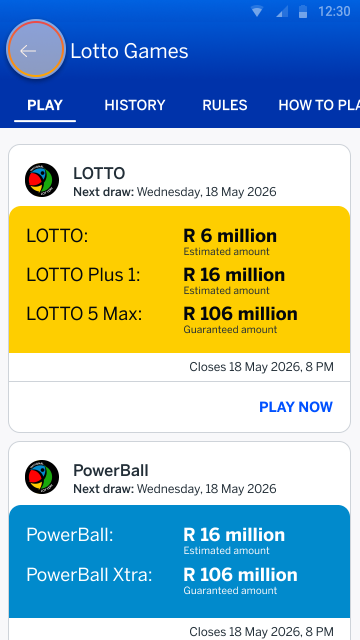
Choose the lottery game you would like to play. You can view the next draw date and the estimated jackpot for each lottery.
Tap PLAY NOW.
Step 4 of 11
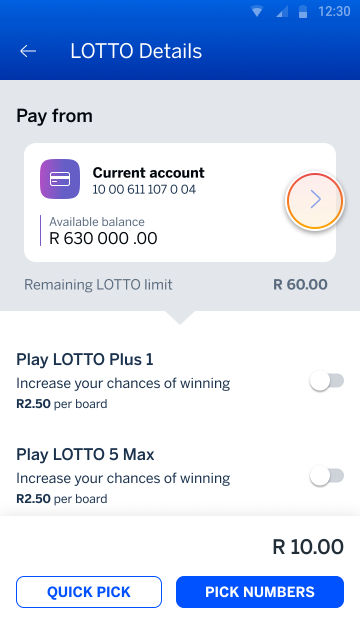
Tap on the account tile to choose the account you want to pay from.
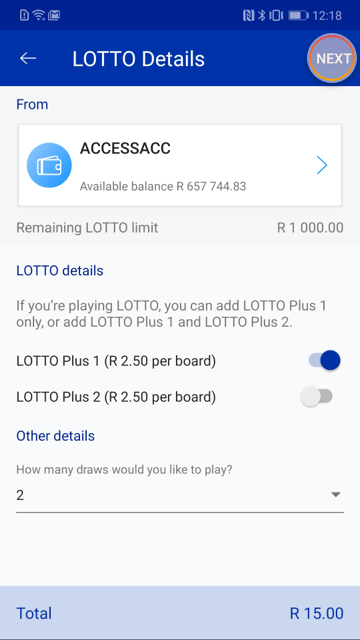
Step 5 of 11
Then scroll down to the lotto details and choose:
- additional lotto games (optional)
- how many boards to play (2–10)
- how many draws to enter (1–10)
To select your own numbers, tap the PICK NUMBERS.
Note:
Tap QUICK PICK and follow the prompts to randomly generate your lotto numbers.
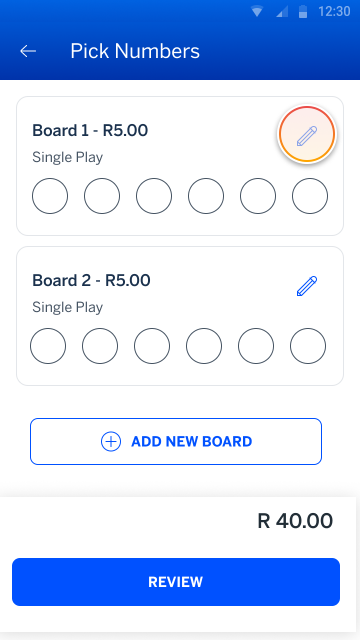
Step 6 of 11
Tap the pencil icon to choose your Lotto numbers.
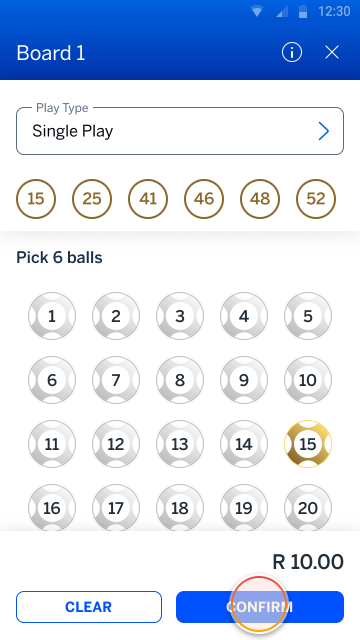
Step 7 of 11
Tap CONFIRM when you're happy with your pick.
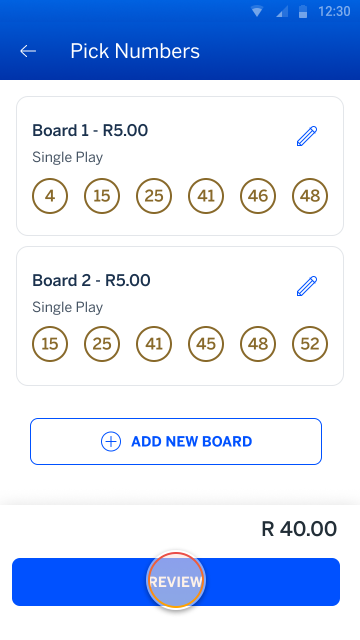
Step 8 of 11
Repeat this process to choose your Lotto numbers for Board 2.
Then tap REVIEW to proceed.
Step 9 of 11
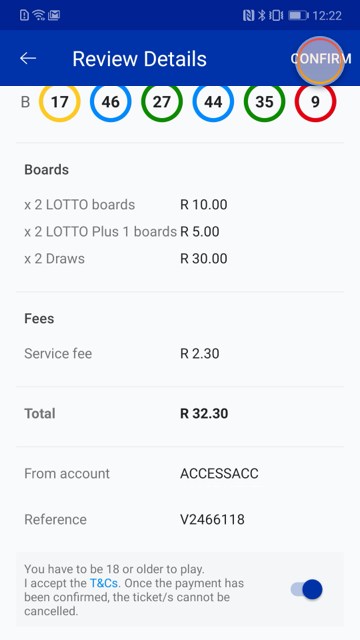
Review your Lotto ticket and accept the T&Cs.
Tap CONFIRM to proceed.
Step 10 of 11
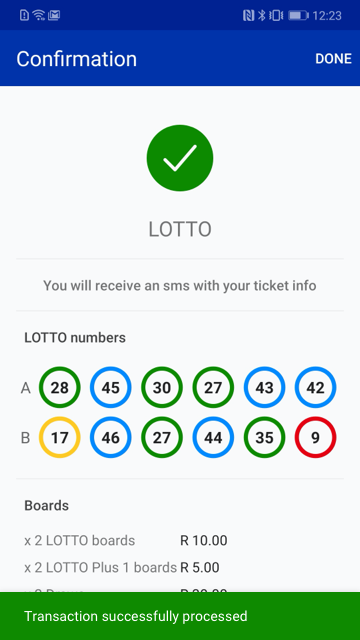
All done! Your lottery ticket has been successfully submitted.
Tap DONE to return to the Buy screen.
Step 11 of 11
You can follow the same process to play the Daily Lotto or PowerBall.
Tap the back arrows (in the header) to return to your home screen.
Frequently asked questions
-
New Lotto
-
Access
-
Games
-
Playing
-
Draws
-
Winnings
What is changing with Lotto?
We’re moving to a new Lotto operator, Sizekhaya. This introduces new game structures, updated pricing, new features, and an improved playing experience.
Do I need to learn a new way to play?
No. The journey on the Banking App remains the same, but you will see new options and features.
What are the benefits of the new Lotto?
You can expect:
- Better odds
- More ways to win
- A more engaging play experience
What changes apply to Lotto games?
- Lotto 5 Max replaces Lotto +2
- Add-on games now use the same numbers as your base game
- You must play the base game to access add-ons
What’s changing with Powerball?
- Price increase (R5 to R10)
- Powerball Plus renamed to Powerball Xtra
- Improved odds due to number range changes
What’s changing with Daily Lotto?
- The add-on game has been removed
- Only the base game remains
- Pricing stays the same
Will my play history be available?
No, your play history won’t be available under the new Lotto structure until further notice.
Which banking channels can I use to play Lotto?
You can currently play Lotto games via the Banking App only.
Why is Lotto not available on Online Banking or Cellphone Banking?
Lotto is temporarily unavailable on Online Banking and Cellphone Banking (USSD) as part of platform changes. You can continue to play via the Banking App.
Why can’t I see Lotto on my Banking App?
- Lotto is only available within South Africa
- Ensure your region is set to South Africa
- Ensure your Banking App is updated:
- iOS: 3.80.0+
- Android: 3.79.0+
Is Lotto available 24/7?
Yes, except during the system break between 20:50 and 21:15.
Who can play Lotto?
You must:
- be 18 years or older
- be registered on the Banking App
- use a qualifying bank account
What Lotto games are available?
- Lotto
- Lotto Plus 1
- Lotto 5 Max
- PowerBall
- PowerBall Xtra
- Daily Lotto
What is the difference between Lotto and PowerBall?
- With Lotto, you pick 6 numbers from a pool of 52 numbers
- With PowerBall, you pick 5 numbers from a pool of 50 plus 1 PowerBall number from a pool of 16
- PowerBall typically offers larger jackpots
What is Daily Lotto?
You can pick 5 numbers from 36, with daily draws and smaller jackpots.
What is Quick Pick?
Quick Pick allows the system to randomly select numbers for you instead of choosing manually.
What is Multiplay?
Multiplay allows you to select extra numbers, and the system generates multiple combinations automatically, increasing your chances to win.
Do I have to use Multiplay?
No, it’s optional.
Why is Multiplay more expensive?
Each combination is treated as a separate entry.
Is Multiplay always available?
No, it’s a promotional feature and may be activated or withdrawn.
What is Lotto 5 Max?
A new add-on replacing Lotto +2 with a guaranteed payout feature.
What does “guaranteed payout” mean?
If the jackpot isn’t won after a set number of draws, the prize money is shared among players in lower winning tiers instead of rolling over indefinitely.
How many boards can I play?
- Minimum: 2
- Maximum: 10 per transaction
Can I play multiple draws in advance?
Yes, up to 10 consecutive draws.
What are the costs per ticket?
- Lotto: R5
- Lotto Plus 1: R2.50
- Lotto 5 Max: R2.50
- PowerBall: R10
- PowerBall Xtra: R5
- Daily Lotto: R3
- Service fee: R2.95 per transaction
How will I receive my Lotto ticket confirmation?
You will receive SMS notifications.
What are the spending limits?
- Daily: R2 000
- Monthly: R30 000
Can I cancel or change a ticket?
No.
What if I don’t have enough funds?
The transaction will fail and no ticket will be issued.
Can I play Lotto on behalf of someone else?
No, the tickets are linked to the account holder.
Is my information secure?
Yes, all transactions are secure.
When are draws held?
- Lotto: Wednesday & Saturday
- PowerBall: Tuesday & Friday
- Daily Lotto: Daily
Can I play on public holidays?
Yes, draws continue as scheduled.
How are winnings paid (less than R249 000)?
- You will receive an SMS within 2 business days
- Funds are paid directly into your account
How are winnings above R249 000 claimed?
You will receive an SMS with:
- Reference number
- Draw details
- Instructions from Sizekhaya
Required documents:
- ID
- Bank confirmation/statement
How long do I have to claim my winnings?
You have 365 days to claim your winnings.
What should I do if I have not received my winnings?
Contact the Digital Helpdesk (0860 123 000) and provide your ticket reference.
Buy it on the app
Securely buy vouchers and play Lotto on the Banking App.
Try it on the app
Scan the QR code to sign in
Register on the Banking App
* Network costs apply when downloading the app
More things you can do on the app

Making purchases
18 Feb 2021
Buy a voucher
Buy and send a gift voucher in a just few quick and easy steps.

Making purchases
3 Feb 2020
Buy airtime
Learn how to buy airtime using the app.
Making purchases
3 Feb 2020
Buy data
Learn how to buy data using the app

Making purchases
24 Oct 2025
Buy prepaid electricity
Learn how to buy electricity in a few easy steps on the app.

New feature
27 Oct 2025
Buy prepaid water
Learn how to buy prepaid water in a few easy steps on the app.