
New feature
11 Aug 2025
Manage Online Stores on your Virtual Card
Secure your online transactions by linking your active retailers to your Virtual Card.
Step 1 of 5
After completing your purchase, you'll be prompted to enable the online retailer for future use. Tap the push notification to enable the retailer.

Step 2 of 5
Sign into to the Standard Bank App.

Step 3 of 5
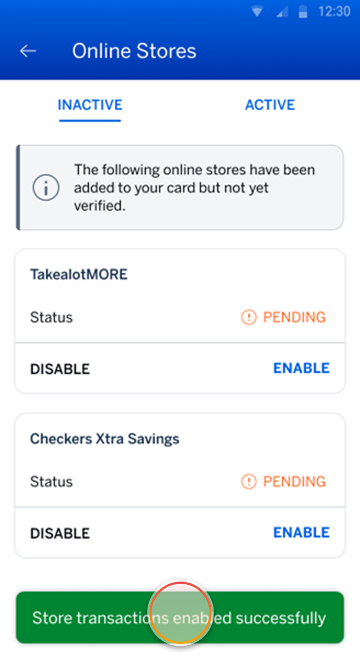
A list of your inactive online retailers will be displayed. Tap ENABLE to allow future transactions at the selected retailer.
Note:
If you don’t enable a retailer, all future transactions will be declined.

Step 4 of 5
You’ll receive a confirmation message that the online retailer has been enabled.
Note:
Your enabled retailers will be listed under the ACTIVE tab.
Step 5 of 5
Disabled retailer will be listed under the INACTIVE tab, with a status of “Disabled”.
You can enable or disable a retailer at anytime on the Banking App.

More things you can do on the app

Managing your money
4 Jul 2025
Create a new Virtual Credit, Evolve or Debit Card
Add a Virtual Card to your account to protect yourself against unauthorised purchases.

Keeping your money safe
13 Jan 2025
Approve your online purchases on your App
Ready to checkout your shopping cart? Approve your online purchases on your app.

New feature
4 Aug 2025
Add a Trusted Person to your profile
Choose someone you trust to spot suspicious transactions.