
New feature
20 Oct 2025
Unclaimed Benefits add-on
You could be owed an unclaimed benefit! See if you have been matched.
Step 1 of 11
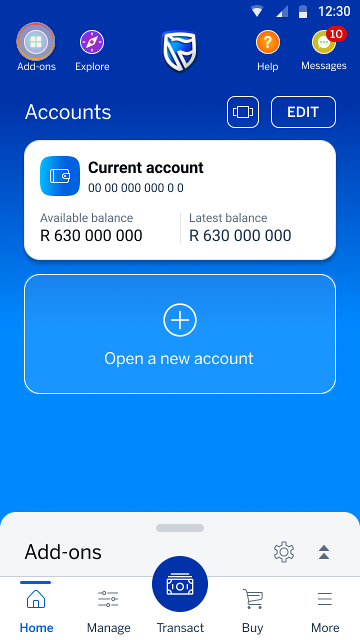
On your home screen, tap the Add-ons icon in the top left-hand corner.
Step 2 of 11
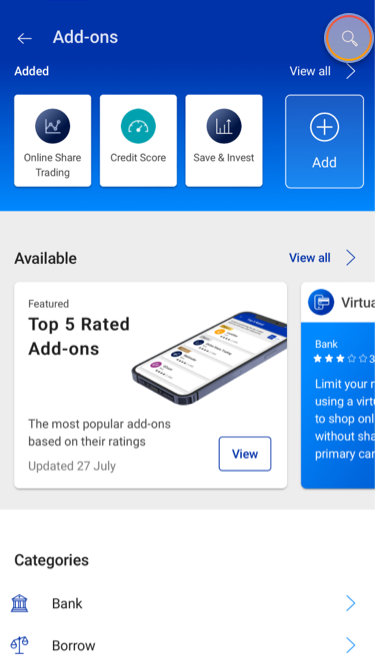
You are now in the Add-on Store. Tap the search icon in the top right-hand corner.
Step 3 of 11
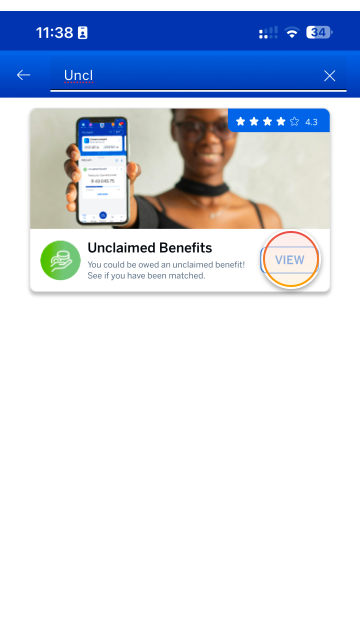
Type “Unclaimed" into the search bar and find the Unclaimed Benefits add-on tile.
Tap the ADD button.
Step 4 of 11
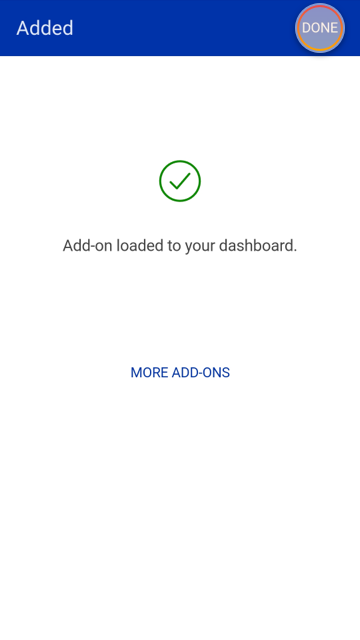
Your Unclaimed Benefits add-on is now loaded onto your home screen.
Tap DONE to return to your home screen.
Step 5 of 11
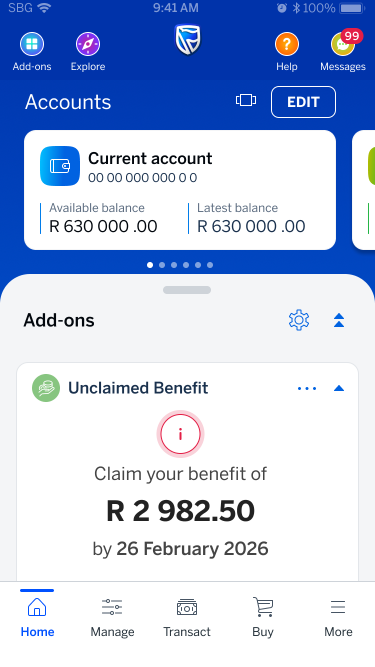
Your Unclaimed Benefits add-on will now appear in the Add-ons drawer in the lower section of your home screen.
Tap CLAIM NOW on the Unclaimed benefits add-on tile.
Step 6 of 11
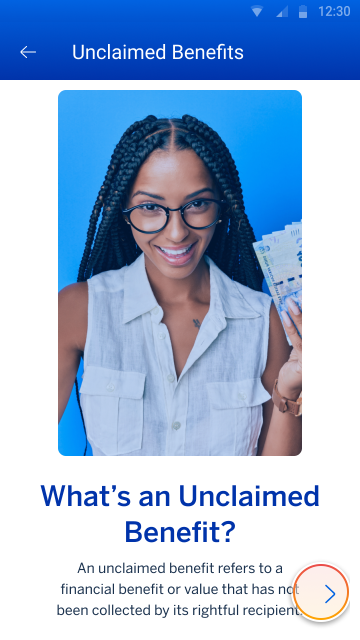
Explore the introductory screens to gain a clearer understanding of unclaimed benefits and how to claim them.
In this section, we’ll cover:
- What is an unclaimed benefit?
- How will I be notified about my unclaimed benefit?
- What steps do I need to take to claim it?
Step 7 of 11
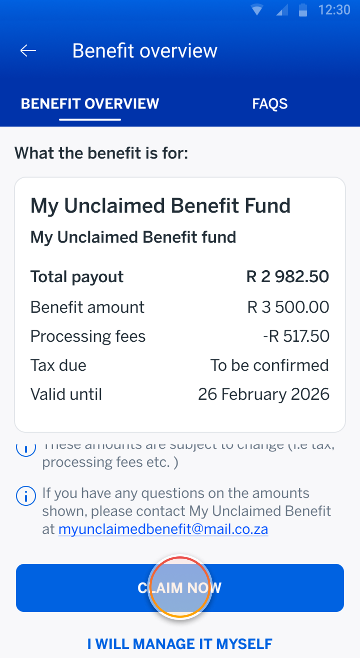
The Benefits Details screen displays the details of your unclaimed benefit.
Tap CLAIM NOW WITH US to proceed with your unclaimed benefits claim.
Step 8 of 11
To continue, you'll need to provide your South African income tax number.
Tap NEXT to submit your tax details.
Note:
You’ll only be asked to provide your tax number if it’s not listed in the Asset Holder’s records.

Step 9 of 11
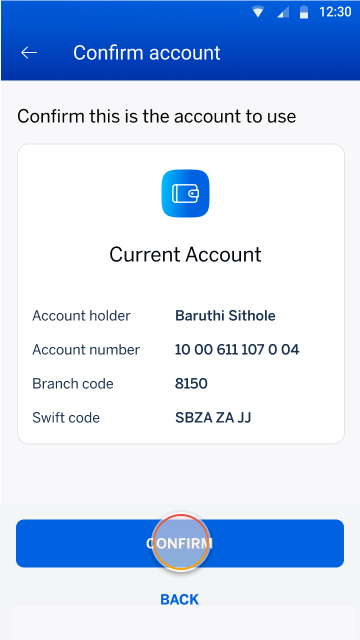
A list of your eligible bank accounts will be displayed.
Choose the account you'd like your unclaimed benefits to be paid into, then tap CONFIRM.
Step 10 of 11
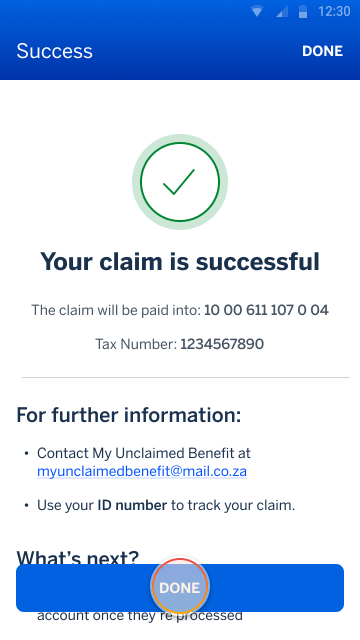
Your claim has been submitted successfully.
Tap DONE to return to the home screen.
Step 11 of 11
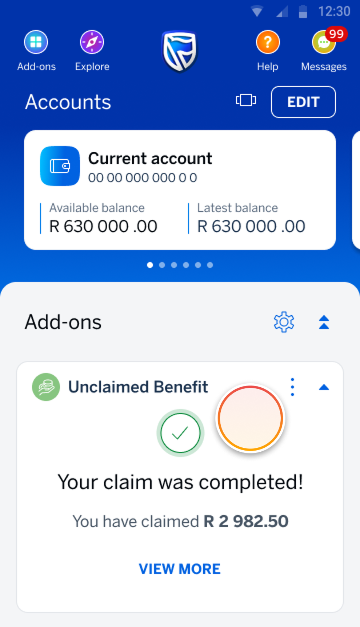
You can now track the progress of your claim on the Unclaimed Benefits Add-on.
Tap DETAILS to view your claim.
Try it on the app
Find and add the Unclaimed Benefits add-on.
Try it on the app
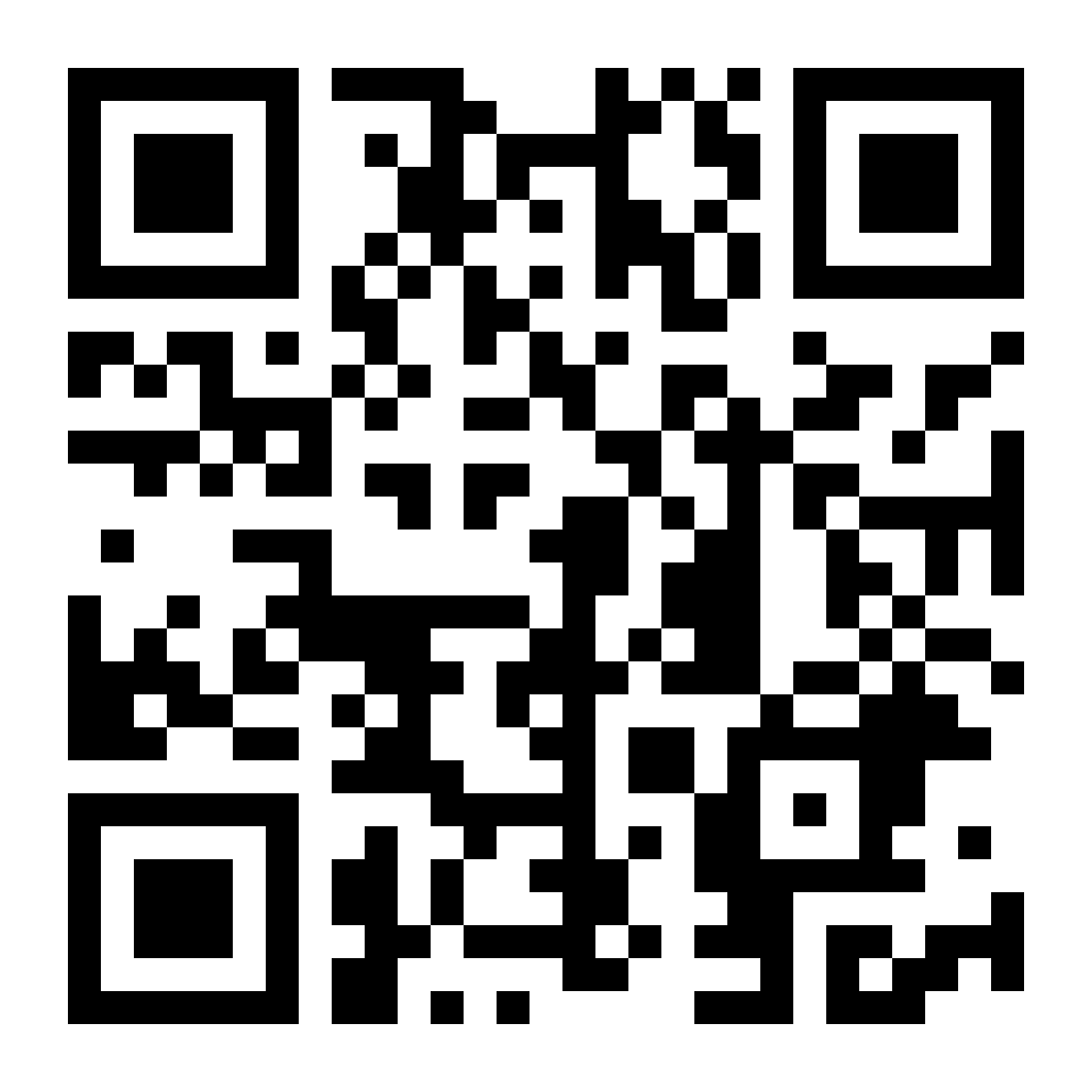
Scan the QR code to sign in
Register on the Banking App
* Network costs apply when downloading the app
Unclaimed Benefits: FAQs
-
Claims
-
Tax
-
Benefit expiration
-
Learn more
Can I qualify for multiple unclaimed benefits from different asset holders?
Yes, you may qualify for more than one unclaimed benefit from separate asset holders, depending on past accounts, policies, or financial products held with those institutions.
What's an unclaimed benefit?
An unclaimed benefit refers to a financial benefit or value that hasn’t been collected by its rightful recipient.
Why am I receiving an unclaimed benefit notification?
The main reason benefits go unclaimed is that policyholder contact details are out of date. This usually happens when people don’t know the benefit exists or have lost touch with the organisation that should pay it out.
How will I be notified of my unclaimed benefit?
A push notification and inbox message will be sent through the Standard Bank App to registered mobile users.
How do I claim my unclaimed benefit?
You can access you unclaimed benefit through the “Unclaimed Benefits Add-on” in the Standard Bank App.
What does it mean to “Claim now with us”?
To have your unclaimed benefit paid into your Standard Bank account.
What does it mean to “Claim from company”?
It means you’ll claim the benefit directly from the company where the unclaimed benefit is from instead of claiming it through Standard Bank.
How do I track my unclaimed benefits after claiming?
To track your unclaimed benefits status, use the add-on widget displayed on the Standard Bank App’s home screen. The widget will display the state and status of your unclaimed benefits depending on which part of the process you’re at.
How will the unclaimed benefits be paid?
You can choose to pay it into your current or savings account. If needed, you can also open a new account. Please allow up to 7 business days for the transfer. Timeframes may vary.
Who handles the payment process?
The payment process is handled by the asset holder and Standard Bank. No action is required by you.
Who is an Asset holder or Fund holder?
An asset holder is a financial institution that is responsible for safeguarding and managing assets that have not been claimed by their rightful owners. While the primary role is to safeguard these assets, they also have a legal obligation to actively seek out and return them to their rightful owners. These assets can include various types of funds such as insurance policies, pension funds and dividends.
Are unclaimed benefits taxed?
Unclaimed benefits are subject to tax implications. The appropriate amount of tax is deducted, and the beneficiary is paid out the balance. An IRP5 will be generated for the beneficiary.
You may be requested to provide your valid SARS tax number.
Why do I need to give my tax number?
So that your claim is processed correctly for tax purposes and reported properly to SARS. It also helps to verify and make sure you get paid as soon as possible.
What happens if I don’t have a tax number?
You may need to apply for one through SARS before submitting your claim.
Does my benefit expire?
No, it doesn’t. But if you’d like to claim it through us, you’ll have to do it by the specified date. After that, you can still claim it directly with the asset holder.
What does it mean when a benefit is no longer available to claim?
It means you won’t be able to claim through us, but can still claim it directly with the asset holder.
How long do I have to claim an unclaimed benefit?
Your unclaimed benefits will stay available until you request a payout. Claiming them sooner can help avoid delays.
However, if no action is taken, the original company (where the unclaimed benefit is from) may stop access to the unclaimed benefit. You’ll still be able to contact them directly.
How can I identify potential fraud related to unclaimed benefits?
Potential signs of fraud related to unclaimed benefits may include receiving an SMS or email promising to help you claim your unclaimed benefits, requesting personal information and banking details.
It’s important to note that we will never request your:
It’s important to note that we will never request your:
- banking details
- PIN codes
- OTPs
- passwords
Are there any fees involved in claiming unclaimed benefits?
Yes, processing fees will be charged for claiming unclaimed benefits. These fees will be deducted before the money is paid out and will clearly be stated in the benefit statement provided to the beneficiary. Be cautious of any requests for payment in relation to your benefits.
What documentation/information do I need to start a claim?
You don’t have to submit any information or documentation to start your claim. Simply follow the process in your Standard Bank App to initiate the claim process.
What can I expect if a Standard Banker calls me?
- They will first verify your identity to ensure they can share information regarding your unclaimed benefits by asking for proof of identification before proceeding.
- They will also confirm which of your existing accounts you would like to receive payment into or if you would like to open a new account to receive payment.
Do I need to register to log a claim?
You don’t need to phone us or register to log claims, any Standard Bank customer who is eligible for an unclaimed benefit will be notified if a claim is found in their name.
What if I am not a registered Standard Bank App user?
- You may receive an SMS or email from Standard Bank instructing you to download and install the Standard Bank App to access your unclaimed benefit.
- It’s important to note that we will never send you an SMS with hyperlinks or call you to ask for sensitive information.
How do I access my unclaimed benefit on the Standard Bank App?
- Sign into your Banking App
- The Unclaimed Benefits add-on will be automatically installed in the add-ons drawer for all eligible beneficiaries identified by Standard Bank
- If you have removed the Unclaimed Benefits add-on, it can be installed from the Add-on Store under the "Available" section
Can I uninstall the add-on if I no longer need it?
Yes, you can uninstall the add-on at any time if you’re no longer using it.
Who do I contact for more information?
If you require more information about your unclaimed benefit, please reach out to the asset holder.
What happens if the claim process fails?
Please send an email to the asset holder.
More things you can do on the app

New feature
27 Oct 2025
Buy prepaid water
Learn how to buy prepaid water in a few easy steps on the app.

New feature
3 Nov 2025
Standard Bank Travel add-on
Get the travel add-on on your Banking App to save up to 40% on flights and get exclusive lifestyle benefits.
Managing your money
1 Jul 2025
Budget Manager add-on
Budgeting is about to get easier with our innovative Budget Manager add-on.